Every Monday, I create a Weekend Roundup for Events in Vacaville. For a long time, the process was completely manual. It worked, and I had already made it reasonably efficient, but it still took me somewhere between 45 minutes and an hour every week.
Today, I spend about the same hour on the overall process. The difference is that I used to get two pieces of content out of that hour. Now I get thirteen.
The interesting part, at least to me, is that I don't think I could have built the system I use today without doing it manually first.
The original workflow wasn't broken
My Weekend Roundup is exactly what it sounds like: a collection of events happening in Vacaville over the coming weekend.
The first version of the workflow started with a SQL script I had written to pull the events I needed from the Events in Vacaville database. Every week, I would open the script, change the date range to the upcoming weekend, and run it. I'd copy the results into a CSV using the same column structure as a Google Sheet template I had created. That structure was intentional because the columns lined up with an Adobe Express template I use for bulk creation.
Before doing anything else, I would review the data. Did I query the right weekend? Did the events look correct? Was anything obviously wrong? Once I was satisfied, I'd use the CSV to bulk-create the Weekend Roundup carousel in Adobe Express.
That part was actually pretty efficient. Then came the social posts.
I'd write some basic copy along the lines of "This weekend's upcoming events," then copy the event information into the post and format everything appropriately. I also wanted to tag the event organizers, so I maintained another CSV containing their social media handles. That meant finding the appropriate organizer handles and adding those to the posts as well.
Eventually, I'd have a Facebook post and an Instagram post ready to schedule. The whole process took around 45 to 60 minutes. None of it was particularly difficult, and that was precisely why it was a good candidate for automation.
I already knew what "done" looked like
I've found there's a big difference between automating something you think you understand and automating something you've actually done repeatedly.
By the time I decided to automate the Weekend Roundup, there wasn't much ambiguity left. I knew where the data came from, which dates I needed, what the CSV should look like, what needed to be reviewed, the format of the social posts, and what the final output should be.
The process had a defined beginning, a series of repeatable steps, and a known outcome. So I built V1 of the Weekend Roundup agent.
It pulled the weekend's events, generated the CSV, and generated Facebook and Instagram copy using the events as the factual source while following the format and voice I wanted. And, perhaps disappointingly for an article about AI, it worked pretty well.
There were some date-formatting issues to work through, and I made adjustments to get the writing closer to my voice. But there wasn't some catastrophic failure that required me to rethink everything. The manual workflow had already done a lot of the design work for me.
Then I followed the remaining friction
V1 didn't automate everything. I still had to look up the Instagram handles for event organizers. It was a small thing, but after removing the larger repetitive tasks, that remaining step became much more noticeable.
So V1.5 wasn't a giant architectural rewrite. I created structured data for the organizer social media handles and extended the workflow so it could find the appropriate Instagram handles and generate them in a separate Markdown file. One more manual lookup disappeared.
This is generally how I prefer to build systems. I don't try to predict every feature I'm eventually going to need. I build something useful, use it, find the next point of friction, and decide whether that friction is worth solving. In this case, it was.
Then the problem got bigger
Eventually, I wanted to start sharing the Weekend Roundup on TikTok and YouTube as well. That changed the problem.
I could have taken the existing agent and kept adding instructions: write the Facebook post this way, write Instagram this way, for YouTube do this, and for TikTok do something completely different. But I had already learned from building my email agent that large prompts with lots of branching behavior become harder to reason about. Changing instructions for one branch can have unexpected effects somewhere else.
So instead of making one Weekend Roundup agent responsible for four increasingly different platforms, I broke the workflow apart.
Every Monday at noon, the Weekend Roundup process starts by fetching the upcoming weekend's event data. That shared work only needs to happen once. Fetching the data is mostly a tool call, so there is no reason for four different agents to repeat it.
Once the data is ready, the workflow hands off to specialized agents. The Facebook agent generates Facebook copy. The Instagram agent generates Instagram copy and connects the relevant organizer handles. The YouTube agent generates content for YouTube. Finally, the TikTok agent gets the summary it needs to generate its copy.
Each agent creates a dated Markdown file for its platform, and the workflow also produces one CSV containing the event list. When everything is finished, I get one Slack notification telling me the Weekend Roundup is ready for review. I don't get four notifications as each individual agent completes its work. The system does its work and asks for my attention when there's something worth looking at.
Not every agent needs all the data
One of the more interesting things I've learned from this version is that specialized agents don't necessarily need the same context. It would be easy to fetch the weekend's events and dump all of that information into every agent, but there isn't much reason to give an agent information it doesn't need.
TikTok is a good example. I don't need its caption to become an event listing because the video itself carries the event information. The caption has a different job, so the TikTok agent doesn't need all of the same event details another platform might need.
This is something I'm still learning. I don't pretend to have Facebook, Instagram, TikTok, and YouTube figured out. My general assumption is that people use all of them to be entertained or informed, but how they consume that information, and how much attention they're willing to give it, varies considerably by platform.
So I've been looking at the analytics and running experiments. If TikTok retention is poor, I can adjust the TikTok strategy. If Instagram behaves differently, I can change the Instagram instructions. Those experiments don't require me to modify one giant prompt and hope I haven't inadvertently affected everything else.
The architecture doesn't exist because I know all the answers. Part of the reason it exists is because I'm still learning them.
I saved 45 minutes and immediately spent it
Here's where the outcome gets interesting.
Before I built the automation, creating one Facebook post and one Instagram post took me roughly 45 to 60 minutes. Today, if I isolate the comparable Facebook and Instagram workflow, I can go from importing the generated CSV into Adobe Express through review and scheduling in about 15 minutes.
There are still things I do manually. Sometimes the generated carousel needs font-size adjustments, for example, and I still review the content before anything gets published. But I didn't take the remaining 30 to 45 minutes and call the project finished. I reinvested it.
Video isn't my forte. I'm still learning how to make it, what works, and what doesn't. I created a reusable Adobe Express video template to make the process easier, and the time saved elsewhere gave me enough capacity to start experimenting.
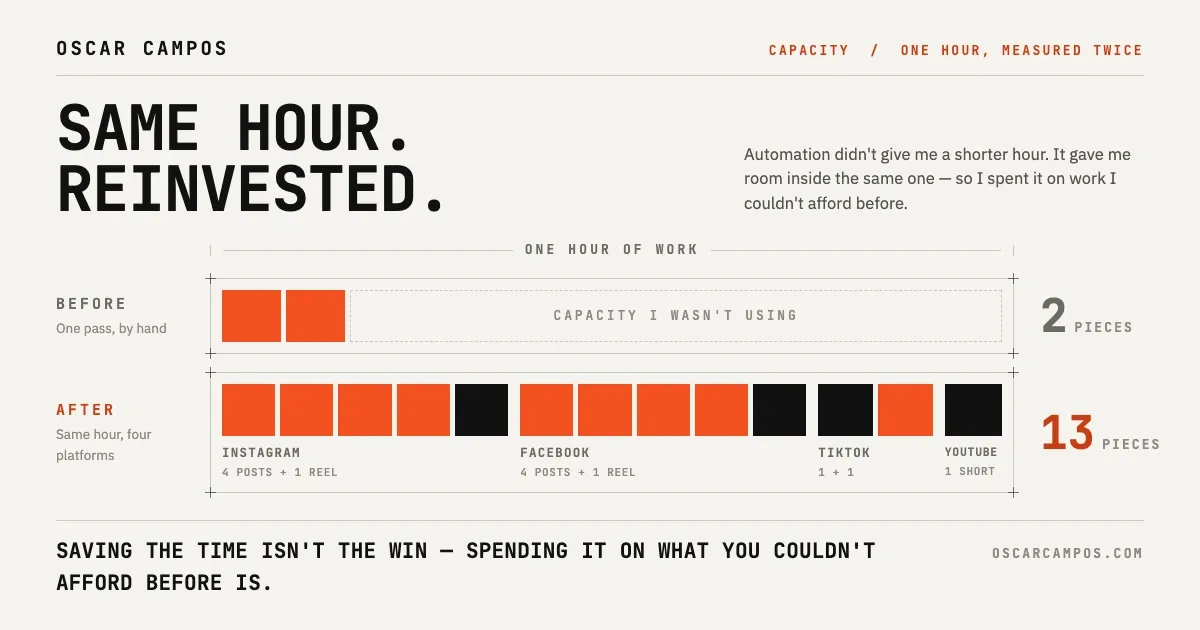
Today, in roughly the same hour I once spent creating one Facebook post and one Instagram post, I can produce:
- 4 Instagram posts
- 1 Instagram Reel
- 4 Facebook posts
- 1 Facebook Reel
- 1 YouTube Short
- 1 TikTok video
- 1 TikTok photo post
That's 13 pieces of content across four platforms in roughly the same amount of time it previously took me to create two.
That's the productivity improvement I care about, but not because thirteen is a bigger number than two. Events in Vacaville exists because local events can be surprisingly difficult to discover. Every additional place I can sustainably share what's happening in Vacaville gives someone another opportunity to find an event they might otherwise have missed.
Without the automation, I probably wouldn't have added TikTok and YouTube. The time savings tipped the scales enough for me to try.
I still wouldn't build V2 first
Knowing everything I know now, if I were starting over tomorrow, I wouldn't begin by building the system I have today. I'd do it manually again.
I'd write the SQL, create the spreadsheet, copy the data around, make the carousel, write the posts, and look up the organizer handles. I'd want to experience the annoying parts myself because that's how I learned which problems were actually worth solving.
The manual workflow gave me something much more useful than a list of requirements. It gave me experience with the process. I knew which steps required judgment, which were repetitive, which information was missing, and which seemingly small tasks became irritating when repeated every week. Then I could build tools specifically around those pain points.
V1 didn't need four specialized agents because I didn't have four platforms. V1.5 didn't need to exist until organizer handles became an obvious remaining friction point. V2 didn't need to exist until the workflow expanded and specialization became valuable.
Each piece of complexity had to earn its way into the system.
Automate what you've learned
There's a temptation with AI right now to look at a business process and immediately ask, "How can I automate all of this?" I'm increasingly convinced that's often the wrong first question.
Do the work, get the workflow functioning, document what works, and experience the friction. Then automate the parts you understand well enough to describe what a successful outcome actually looks like. Don't automate the workflow you imagine. Automate the workflow you've experienced.
And when the automation finally gives you some of your time back, you don't necessarily have to use that time to do less. Sometimes the better opportunity is to reinvest it into something you couldn't afford to do before.
For me, that meant going from two pieces of content on two platforms to thirteen across four, while spending roughly the same amount of my time. The automation didn't make me stop doing the work. It gave me room to do more of the work that might actually help people.